
Order status updates
The POS provider can update order statuses by specifying the orderStatus parameter of some order APIs, such as notifyOrderChange and inquireOrderDetail. These updates are important for stakeholders to track order progress and maintain effective communication. This topic helps the POS provider to specify the orderStatus parameter by explaining different order statuses and providing guidance on how to update orders to subsequent statuses.
Order statuses
The following table lists all possible values of the orderStatus parameter and their descriptions. Note the valid enumeration value can vary for different order APIs.
orderStatus value | Final status | Description |
ORDER_SUCCESS | No | The POS provider creates the order successfully. |
ACCEPTED | No | The merchant accepts the order. |
PREPARING | No | The order is being prepared. |
READY | No | The order is ready for the buyer to pick up or enjoy. |
COMPLETED | Varies | The order is completed. Notes:
|
CANCELLED | Yes | The order is canceled. |
REJECTED | Yes | The merchant rejects the order. |
ORDER_FAIL | Yes | The order failed due to either of the following reasons:
|
Order journey
The POS provider needs to specify the orderStatus parameter according to a valid order journey. The following diagram shows how an incoming order progresses to its final status:
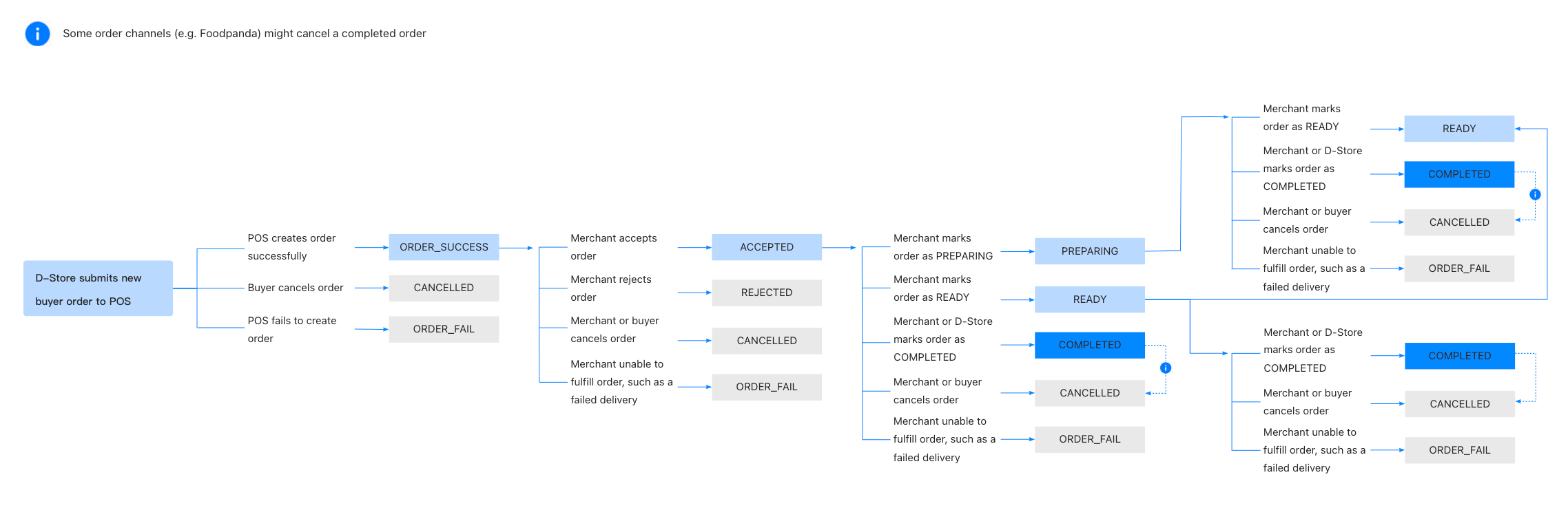
Figure 1. Order journey
Based on the order journey, the POS provider needs to meet the following rules when updating the order status:
- For a new order, its subsequent status can be one of the following:
ORDER_SUCCESSCANCELLED(final status)ORDER_FAIL(final status)
- For an
ORDER_SUCCESSorder, its subsequent status can be one of the following:
ACCEPTEDREJECTED(final status)CANCELLED(final status)ORDER_FAIL(final status)
- For an
ACCEPTEDorder, its subsequent status can be one of the following:
PREPARINGREADYCOMPLETED(final status on the POS side)CANCELLED(final status)ORDER_FAIL(final status)
- For a
PREPARINGorder, its subsequent status can be one of the following:
READYCOMPLETED(final status on the POS side)CANCELLED(final status)ORDER_FAIL(final status)
- For a
READYorder, its subsequent status can be one of the following:
COMPLETED(final status on the POS side)CANCELLED(final status)ORDER_FAIL(final status)
- The POS provider cannot update the status of the order that reaches its final status.