
syncProduct
POST /v2/pos/syncProduct
The syncProduct API is called by the POS provider to synchronize with D-Store the product information of a specific store. You can call this API in the following scenarios:
- Synchronize full product information when creating or updating products. Note that:
- For each request, pass the latest information for all products in the store because new requests overwrite previous data.
- Pass only actual products in the store because all synchronized products appear in D-Store Console for merchants to set up their store menu.
- Update the statuses of single items and modifiers (identified by the value
SINGLEorMODIFIERin the products.type field). In this scenario, you can pass only the products that need to be updated. Note that:
- Specify the required parameters only. Including optional parameters results in D-Store processing the request as a full product information synchronization.
- If any specified product (identified by products.posProductId) is reused, then the updated product status applies to any groups, combos, or bundles that include this product.
Structure
A message consists of a header and body. The following sections are focused on the body structure. For the header structure, see:
Request parameters
Field | Data type | Required | Description |
requestId | String | Yes | The unique ID that is assigned by the POS provider to identify a product synchronization request. Maximum length: 255 characters Note: This field is an idempotency key field. For the syncProduct requests that are initiated with the same requestId value, D-Store must return the same result. For details about API idempotency, see the Idempotency chapter. |
posAccountId | String | Yes | The unique ID that is assigned by the POS provider to identify a merchant account. This identifier also marks a single digital store that can include multiple store locations. Maximum length: 255 characters |
store | Yes | The store whose product information is to be synchronized or updated. | |
products | Array<Product> | Yes | The product list of the store. The product quantity must adhere to the following restrictions:
|
extendInfo | Object | No | An extended attribute that is used to provide additional information if necessary. Maximum length: 4096 characters |
Response parameters
Field | Data type | Required | Description |
result | Yes | The result of the API call. |
More information
How to handle the result
You might receive different results from D-Store. Follow the instructions in this table to handle the result.
result.resultStatus | result.resultCode | Synchronization status | Actions |
S |
| Successful | N/A |
F | Multiple possible values exist, such as
| Failed | Take actions according to the result message (specified in the result.resultMessage parameter). For more information, see Result codes. |
U |
| Unknown | Use the same parameters to retry the syncProduct request. If you keep receiving the same result indicating the unknown status, contact overseas_support@service.alibaba.com. |
No result received | Unknown | Use the same parameters to retry the syncProduct request. If you keep receiving no results, contact overseas_support@service.alibaba.com. | |
Result codes
Result code | Result status | Result message | Further action |
SUCCESS | S | success | N/A |
PROCESS_FAIL | F | A general business failure occurred. Do not retry. | Contact overseas_support@service.alibaba.com to troubleshoot the issue. |
PARAM_ILLEGAL | F | Parameter names or values do not meet the specified requirements. The result message can vary according to the specific error encountered. | Check whether the request parameters, including the header parameters and body parameters, are correct and valid. For more information about the parameters of this API, see the Structure section. |
INVALID_API | F | The called API is invalid or not active. | Check whether the correct API name is used when making the API call. |
INVALID_SIGNATURE | F | Signature is invalid. | Check whether the public key, signed message, and signature algorithm are as expected. |
ACCESS_DENIED | F | Access is denied | Contact overseas_support@service.alibaba.com to troubleshoot the issue. |
REQUEST_TRAFFIC_EXCEED_LIMIT | F | The request traffic exceeds the limit. | Reduce the API calling frequency. |
UNKNOWN_EXCEPTION | U | An API calling is failed, which is caused by unknown reasons. | Recall the API. |
Request examples
Sync full product information
The following sections show how to construct request bodies for synchronizing full product information according to the product types:
Basic example
The following figure shows the structure of a basic example where the product includes a single item (chicken burger) without any modifiers.

Then, the request example is shown below.
{
  "requestId":"20231220bsefibb334",
  "posAccountId": "bk001",
  "store": {
    "posStoreId": "s1",
    "name": "s1-name"
  },
  "products": [
    {
      "posProductId": "p1",
      "type": "SINGLE",
      "status": "AVAILABLE",
      "name": "chicken burger",
      "price": {"currency": "SGD", "value": 1000}
    }
  ]
}
Modifier group
The following figure shows the data structure of an example where the product includes a single item (cola) with a modifier (with ice or without ice).
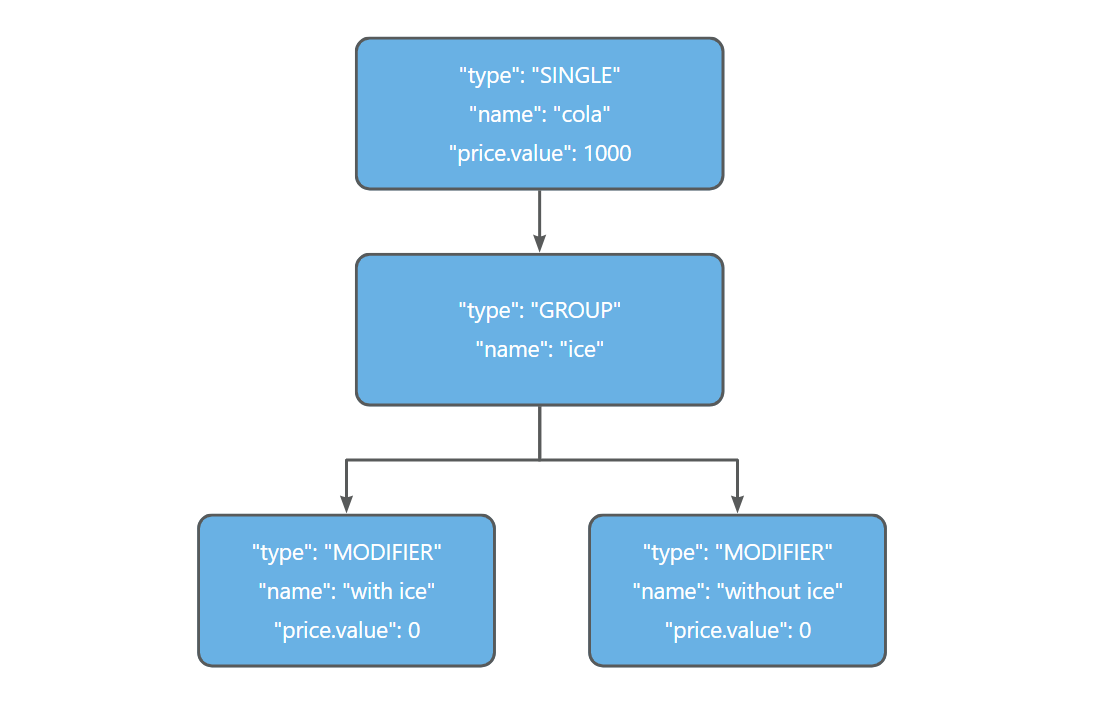
Then, the request example is shown below.
{
  "requestId":"20231220bsefibb334",
  "posAccountId": "bk001",
  "store": {
    "posStoreId": "s1",
    "name": "s1-name"
  },
  "products": [
    {
      "posProductId": "p1",
      "type": "SINGLE",
      "status": "AVAILABLE",
      "name": "cola",
      "price": {"currency": "SGD", "value": 1000},
      "subProducts": ["g1"]
    },
    {
      "posProductId": "g1",
      "type": "GROUP",
      "status": "AVAILABLE",
      "name": "ice",
      "quantityRule": {"min": 0, "max": 1},
      "subProducts": ["p2", "p3"]
    },
    {
      "posProductId": "p2",
      "type": "MODIFIER",
      "status": "AVAILABLE",
      "name": "with ice",
      "price": {"currency": "SGD", "value": 0},
      "quantityRule": {"min": 0, "max": 1}
    },
    {
      "posProductId": "p3",
      "type": "MODIFIER",
      "status": "AVAILABLE",
      "name": "without ice",
      "price": {"currency": "SGD", "value": 0},
      "quantityRule": {"min": 0, "max": 1}
    }
  ]
}
Nested modifiers
The following figure shows the data structure of an example where the product includes a single item (coffee) with one modifier added to another, which is also called nested modifiers. In this example, one modifier of coffee is hot/cold (hot or cold) and another modifier (with ice or without ice) is added to cold.
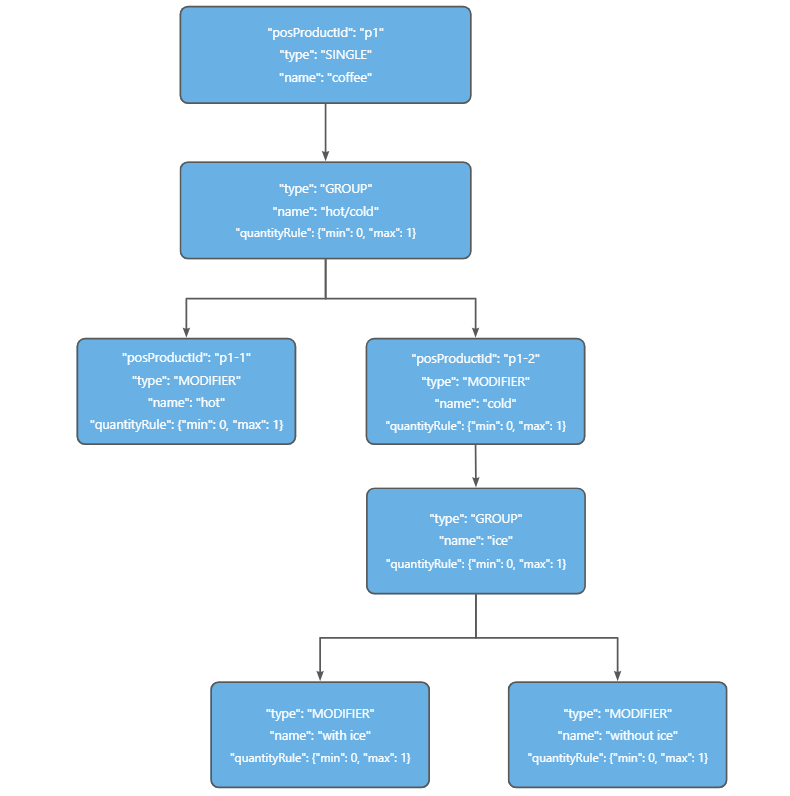
Then, the request example is shown below.
{
  "requestId":"20231220bsefibb334",
  "posAccountId": "bk001",
  "store": {
    "posStoreId": "s1",
    "name": "s1-name"
  },
  "products": [
    {
      "posProductId": "p1",
      "type": "SINGLE",
      "status": "AVAILABLE",
      "name": "coffee",
      "price": {"currency": "SGD", "value": 0},
      "subProducts": ["g1"]
    },
    {
      "posProductId": "g1",
      "type": "GROUP",
      "status": "AVAILABLE",
      "name": "hot/cold",
        "quantityRule": {"min": 0, "max": 1},
      "subProducts": ["p1-1", "p1-2"]
    },
    {
      "posProductId": "p1-1",
      "type": "MODIFIER",
      "status": "AVAILABLE",
      "name": "hot",
        "price": {"currency": "SGD", "value": 500},
      "quantityRule": {"min": 0, "max": 1}
    },
    {
      "posProductId": "p1-2",
      "type": "MODIFIER",
      "status": "AVAILABLE",
      "name": "cold",
        "price": {"currency": "SGD", "value": 700},
      "quantityRule": {"min": 0, "max": 1},
      "subProducts": ["g2"]
    },
    {
      "posProductId": "g2",
      "type": "GROUP",
      "status": "AVAILABLE",
      "name": "ice",
      "quantityRule": {"min": 0, "max": 1},
      "subProducts": ["p5", "p6"]
    },
    {
      "posProductId": "p5",
      "type": "MODIFIER",
      "status": "AVAILABLE",
      "name": "with ice",
      "price": {"currency": "SGD", "value": 0},
      "quantityRule": {"min": 0, "max": 1}
    },
    {
      "posProductId": "p6",
      "type": "MODIFIER",
      "status": "AVAILABLE",
      "name": "without ice",
      "price": {"currency": "SGD", "value": 0},
      "quantityRule": {"min": 0, "max": 1}
    }
  ]
}
Variant product
The following figure shows the data structure of an example where the product includes single items (short coffee, tall coffee, and grande coffee) that share a common modifier (with ice or without ice). This kind of product is also called a variant product.
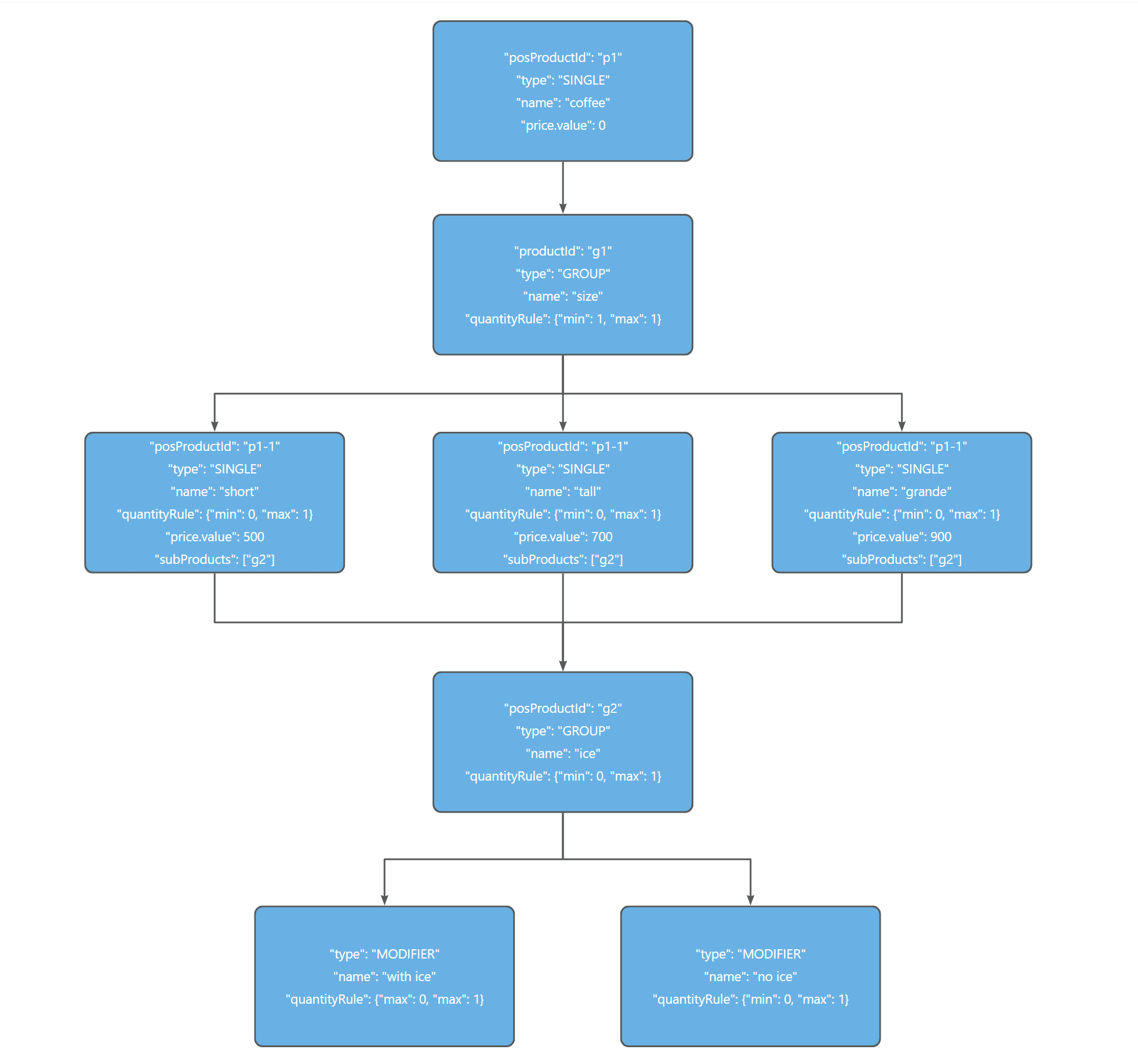
Then, the request example is shown below.
{
  "requestId":"20231220bsefibb334",
  "posAccountId": "bk001",
  "store": {
    "posStoreId": "s1",
    "name": "s1-name"
  },
  "products": [
    {
      "posProductId": "p1",
      "type": "SINGLE",
      "status": "AVAILABLE",
      "name": "coffee",
      "price": {"currency": "SGD", "value": 0},
      "subProducts": ["g1"]
    },
    {
      "posProductId": "g1",
      "type": "GROUP",
      "status": "AVAILABLE",
      "name": "size",
      "quantityRule": {"min": 1, "max": 1},
      "subProducts": ["p1-1", "p1-2", "p1-3"]
    },
    {
      "posProductId": "p1-1",
      "type": "SINGLE",
      "status": "AVAILABLE",
      "name": "short",
      "price": {"currency": "SGD", "value": 500},
      "quantityRule": {"min": 0, "max": 1000},
      "overloads": [
        {
          "posProductIds": ["g1"],
          "quantityRule": {"min": 0, "max": 1}
        }
      ],
      "subProducts": ["g2"]
    },
    {
      "posProductId": "p1-2",
      "type": "SINGLE",
      "status": "AVAILABLE",
      "name": "tall",
      "price": {"currency": "SGD", "value": 700},
      "quantityRule": {"min": 0, "max": 1000},
      "overloads": [
        {
          "posProductIds": ["g1"],
          "quantityRule": {"min": 0, "max": 1}
        }
      ],
      "subProducts": ["g2"]
    },
    {
      "posProductId": "p1-3",
      "type": "SINGLE",
      "status": "AVAILABLE",
      "name": "grande",
      "price": {"currency": "SGD", "value": 900},
      "quantityRule": {"min": 0, "max": 1000},
      "overloads": [
        {
          "posProductIds": ["g1"],
          "quantityRule": {"min": 0, "max": 1}
        }
      ],
      "subProducts": ["g2"]
    },
    {
      "posProductId": "g2",
      "type": "GROUP",
      "status": "AVAILABLE",
      "name": "ice",
      "quantityRule": {"min": 0, "max": 1},
      "subProducts": ["p5", "p6"]
    },
    {
      "posProductId": "p5",
      "type": "SINGLE",
      "status": "AVAILABLE",
      "name": "with ice",
      "price": {"currency": "SGD", "value": 0},
      "quantityRule": {"min": 0, "max": 1}
    },
    {
      "posProductId": "p6",
      "type": "SINGLE",
      "status": "AVAILABLE",
      "name": "without ice",
      "price": {"currency": "SGD", "value": 0},
      "quantityRule": {"min": 0, "max": 1}
    }
  ]
}
Combo meal
The following figure shows the data structure of an example where the product includes combination items (burger and beverage). This kind of product is also called a combo meal.
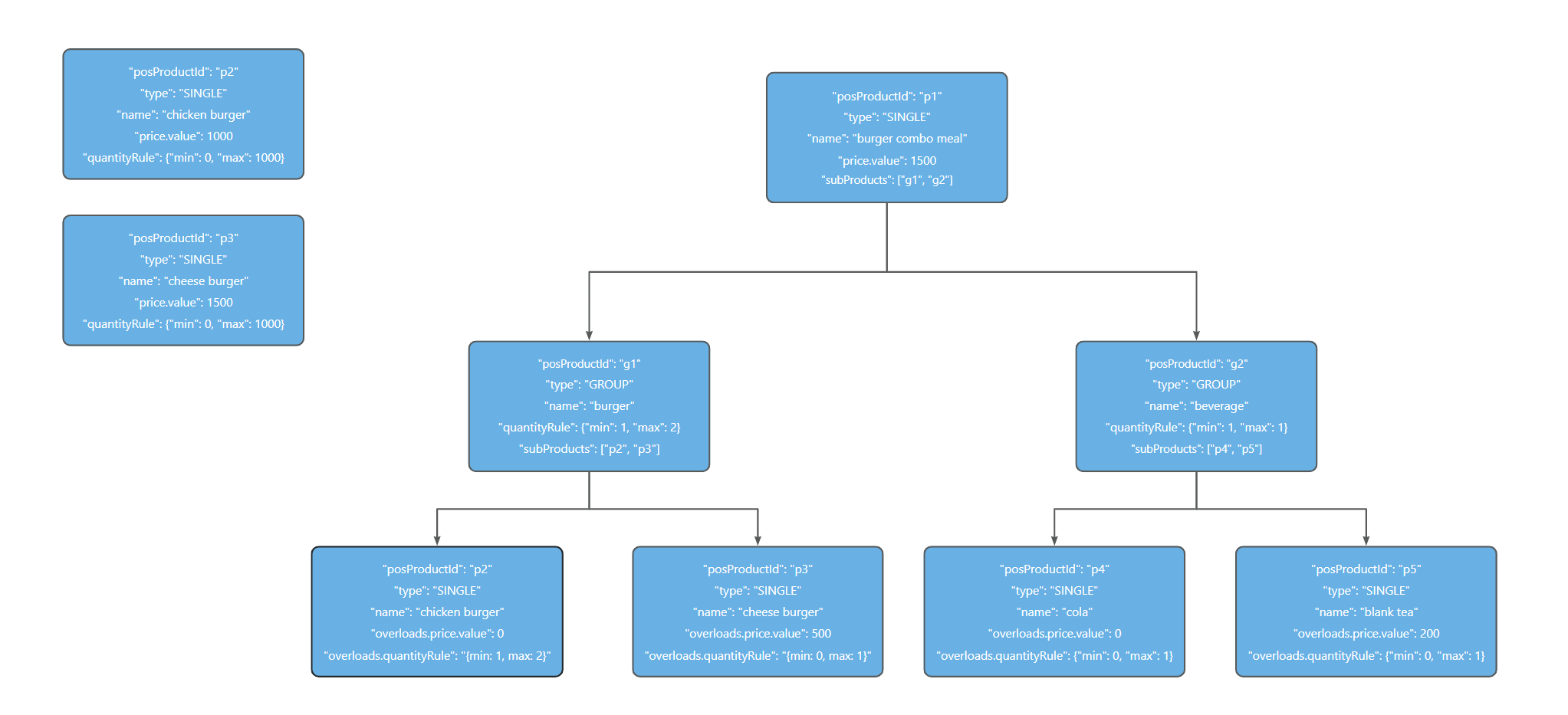
In this example, ensure to specify the following request parameters correctly:
- products.overloads.price.value: Set to the price of the specific single item in the combo meal, which is always lower than the price of the single item. For example, the price of a chicken burger is 1000 while that in the combo meal is 0.
- products.overloads.quantityRule: Set the quantity rule for the bundle, which is always different from that of the single item.
Then, the request example is shown below.
{
  "requestId":"20231220bsefibb334",
  "posAccountId": "bk001",
  "store": {
    "posStoreId": "s1",
    "name": "s1-name"
  },
  "products": [
    {
      "posProductId": "p1",
      "type": "SINGLE",
      "status": "AVAILABLE",
      "name": "burger set meal",
      "price": {"currency": "SGD", "value": 2000},
      "subProducts": ["g1", "g2"]
    },
    {
      "posProductId": "g1",
      "type": "GROUP",
      "status": "AVAILABLE",
      "name": "burger",
      "quantityRule": {"min": 1, "max": 2},
      "subProducts": ["p2", "p3"]
    },
    {
      "posProductId": "p2",
      "type": "SINGLE",
      "status": "AVAILABLE",
      "name": "chicken burger",
      "price": {"currency": "SGD", "value": 1000},
      "quantityRule": {"min": 0, "max": 1000},
      "overloads": [
        {
          "posProductIds": ["g1"],
          "price": {"currency": "SGD", "value": 0},
          "quantityRule": {"min": 1, "max": 2}
        }
      ]
    },
    {
      "posProductId": "p3",
      "type": "SINGLE",
      "status": "AVAILABLE",
      "name": "cheese burger",
      "price": {"currency": "SGD", "value": 1500},
      "quantityRule": {"min": 0, "max": 1000},
      "overloads": [
        {
          "posProductIds": ["g1"],
          "price": {"currency": "SGD", "value": 500},
          "quantityRule": {"min": 0, "max": 1}
        }
      ]
    },
    {
      "posProductId": "g2",
      "type": "GROUP",
      "status": "AVAILABLE",
      "name": "beverage",
      "quantityRule": {"min": 0, "max": 1},
      "subProducts": ["p4", "p5"]
    },
    {
      "posProductId": "p4",
      "type": "SINGLE",
      "status": "AVAILABLE",
      "name": "cola",
      "price": {"currency": "SGD", "value": 1500},
      "quantityRule": {"min": 0, "max": 1000},
      "overloads": [
        {
          "posProductIds": ["g2"],
          "price": {"currency": "SGD", "value": 0},
          "quantityRule": {"min": 0, "max": 1}
        }
      ]
    },
    {
      "posProductId": "p5",
      "type": "SINGLE",
      "status": "AVAILABLE",
      "name": "blank tea",
      "price": {"currency": "SGD", "value": 2000},
      "quantityRule": {"min": 0, "max": 1000},
      "overloads": [
        {
          "posProductIds": ["g2"],
          "price": {"currency": "SGD", "value": 500},
          "quantityRule": {"min": 0, "max": 1}
        }
      ]
    }
  ]
}
Bundle
The following figure shows the data structure of an example where the product includes a bundle of single items (different types of coffee).
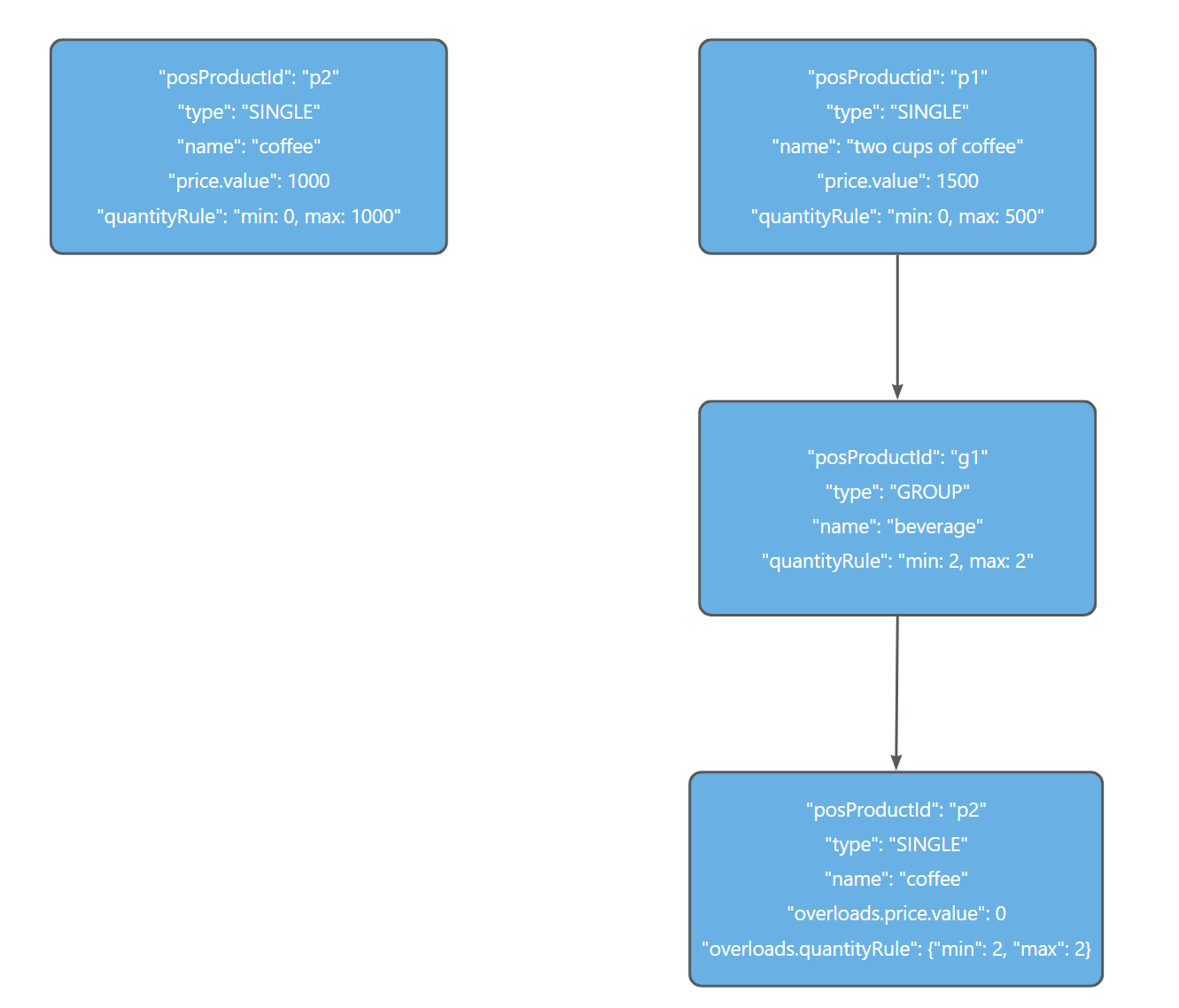
In this example, ensure to specify the following request parameters correctly:
- products.overloads.price.value: Set to the price of a cup of coffee in the bundle, which is always lower than the price of the single item.
- products.overloads.quantityRule: Set the quantity rule for the bundle, which is always different from that of the single item.
Then, the request example is shown below.
{
  "requestId":"20231220bsefibb334",
  "posAccountId": "bk001",
  "store": {
    "posStoreId": "s1",
    "name": "s1-name"
  },
  "products": [
    {
      "posProductId": "p1",
      "type": "SINGLE",
      "status": "AVAILABLE",
      "name": "two cups of coffee",
      "price": {"currency": "SGD", "value": 1500},
      "subProducts": ["g1"]
    },
    {
      "posProductId": "g1",
      "type": "GROUP",
      "status": "AVAILABLE",
      "name": "beverage",
      "quantityRule": {"min": 2, "max": 2},
      "subProducts": ["p2"]
    },
    {
      "posProductId": "p2",
      "type": "SINGLE",
      "status": "AVAILABLE",
      "name": "coffee",
      "price": {"currency": "SGD", "value": 1000},
      "quantityRule": {"min": 0, "max": 1000},
      "overloads": [
        {
          "posProductIds": ["g1"],
          "price": {"currency": "SGD", "value": 0},
          "quantityRule": {"min": 2, "max": 2}
        }
      ]
    }
  ]
}
Update product status
The following sections show how to construct request bodies for updating product statuses for single items and modifiers respectively:
Single items
The following figure shows an example of a single item (chicken burger) that is included in both the chicken burger combo meal and the burger combo meal. If you update its status from AVAILABLE to SOLDOUT, this update affects the chicken burger within both combo meals.
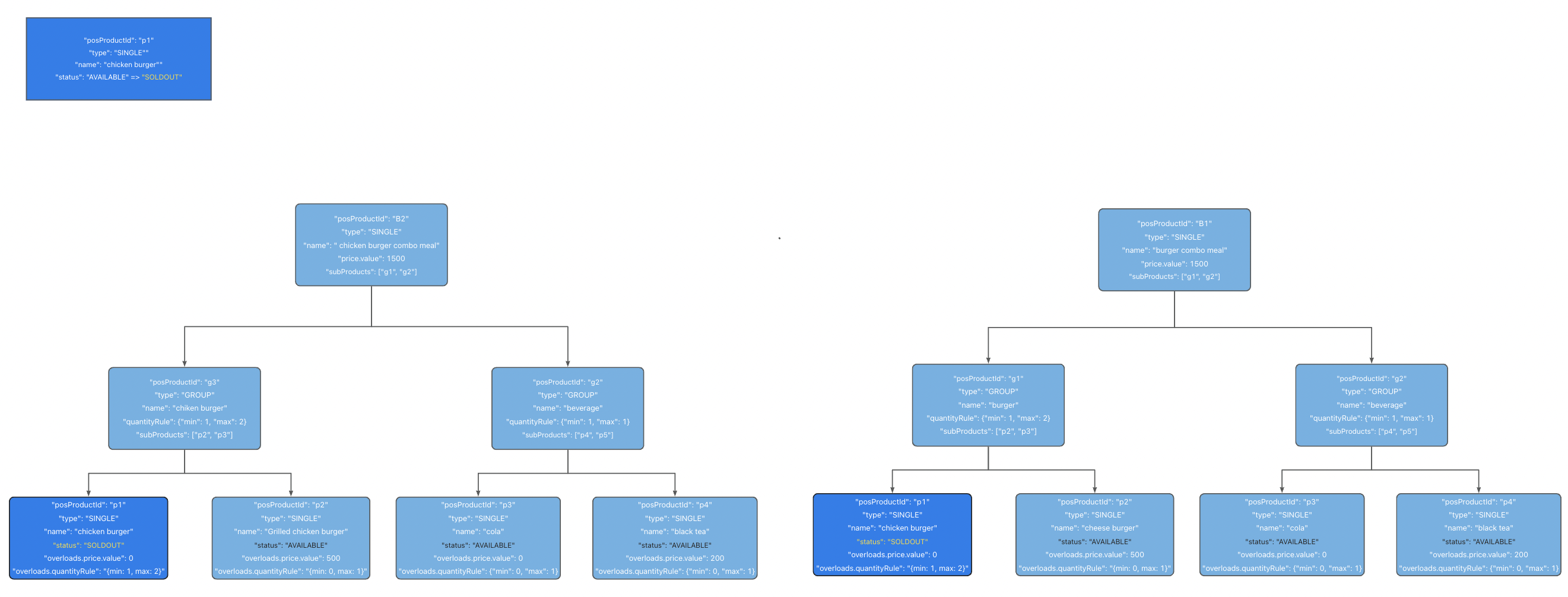
The product status update request for this example is shown as follows:
{
  "requestId":"20231220bsefibb334",
  "posAccountId": "bk001",
  "store": {
    "posStoreId": "s1"
  },
  "products": [
    {
      "posProductId": "p1",
      "status": "SOLDOUT"
    }
  ]
}
Modifiers
The following figure shows an example of a modifier (with ice) that is available for both cola and sprite. If you update its status from AVAILABLE to SOLDOUT, this update affects the with ice modifier within both beverages.
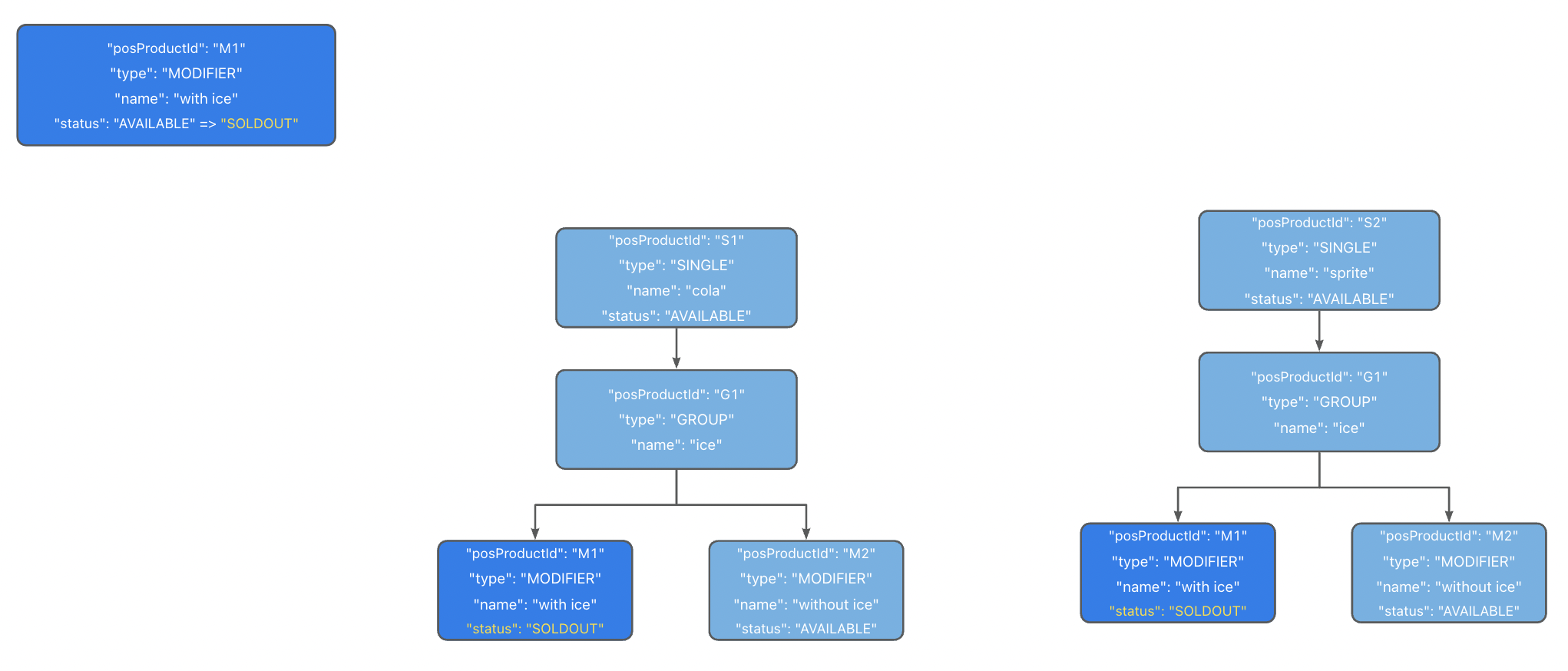
The product status update request for this example is shown as follows:
{
  "requestId":"20231220bsefibb334",
  "posAccountId": "bk001",
  "store": {
    "posStoreId": "s1",
    "name": "s1-name"
  },
  "products": [
    {
      "posProductId": "M1",
      "status": "SOLDOUT",
    }
  ]
Sample codes
The following sections provide sample codes for different syncProduct request scenarios:
Sync full product information
To speed up your development and testing, D-Store offers full sample codes of the syncProduct API for synchronizing full product information. You can directly copy and paste the sample codes into your local codes and customize them if necessary.
Request body
Use the following code to construct a request body.
{"requestId":"20231220bsefibb334","posAccountId":"bk001","store":{"posStoreId":"s1","name":"s1-name"},"products":[{"posProductId":"p1","type":"SINGLE","status":"AVAILABLE","name":"green tea","price":{"currency":"SGD","value":1000}}]}Request signing
To sign a syncProduct request, put the following signature in the request header.
EVCRST9tbtIaCqYvozPbVhi7d0D5rfdIHUUh6fIjx7nf9%2FeCbkRFrxoCOzzp3ac%2FcMhQnxtmvYZFOQDLAmhzUjhB68Z3bMm0O03wqPExowRlDHGFPWJL8bmgUQMGyblViAfCaSjCcpCa1C%2Fk6A6CCaAAh9MRMNQZ8X36lS5f64Db07IIKIJ53aqDl40y4MNUcJiY3nDmOZeVxATUubKc8HnZgm2IkgxEOqRpodP%2FWAyZq8iHR4rID%2B4xeQDGdPTlRg3Z3G15lebb38yuukgcYE337rYjMgENTDol3rWz1ZTMJ5pwPxWkT5rlqE%2FG55tyDf6dfy%2BxK3bt9JLvL3bb8A%3D%3DThe signature above is generated according to the common private key obtained in the Exchange sandbox resources step and the request body above If you use your own private key or customize the request body, refer to Sign a request to generate a new signature.
Request calling
After signing a request, use the following code to call a syncProduct request.
curl --location 'https://open-region-pre.alipayplus.com/v2/pos/syncProduct' \
--header 'content-type: application/json' \
--header 'client-id: 375Y903U2Y45KE00600' \
--header 'request-time: 2022-10-10T23:00:56+08:00' \
--header 'signature: algorithm=RSA256,keyVersion=1,signature=EVCRST9tbtIaCqYvozPbVhi7d0D5rfdIHUUh6fIjx7nf9%2FeCbkRFrxoCOzzp3ac%2FcMhQnxtmvYZFOQDLAmhzUjhB68Z3bMm0O03wqPExowRlDHGFPWJL8bmgUQMGyblViAfCaSjCcpCa1C%2Fk6A6CCaAAh9MRMNQZ8X36lS5f64Db07IIKIJ53aqDl40y4MNUcJiY3nDmOZeVxATUubKc8HnZgm2IkgxEOqRpodP%2FWAyZq8iHR4rID%2B4xeQDGdPTlRg3Z3G15lebb38yuukgcYE337rYjMgENTDol3rWz1ZTMJ5pwPxWkT5rlqE%2FG55tyDf6dfy%2BxK3bt9JLvL3bb8A%3D%3D' \
--data '{"requestId":"20231220bsefibb334","posAccountId":"bk001","store":{"posStoreId":"s1","name":"s1-name"},"products":[{"posProductId":"p1","type":"SINGLE","status":"AVAILABLE","name":"green tea","price":{"currency":"SGD","value":1000}}]}'
If you customize the request body and the signature, replace <requestBody> and <generatedSignature> in the following code with the customized ones.
curl --location 'https://open-region-pre.alipayplus.com/v2/pds/store/syncProduct' \
--header 'content-type: application/json' \
--header 'client-id: 375Y903U2Y45KE00600' \
--header 'request-time: 2022-10-10T23:00:56+08:00' \
--header 'signature: algorithm=RSA256,keyVersion=1,signature=<generatedSignature>' \
--data '<requestBody>'
Response body
If the API call succeeds, the syncProduct response body is returned as the following code.
{"result":{"resultCode":"PARAM_ILLEGAL","resultMessage":"Illegal parameters. For example, non-numeric input, invalid date.","resultStatus":"F"}}Update product status
Request body
The following sample code shows that the POS provider updates the status of a product to AVAILABLE:
{
    "requestId":"20231220bsefibb334",
    "posAccountId":"bk001",
    "store":{
        "posStoreId":"s1"
    },
    "products":[
        {
            "posProductId":"p1",
            "status":"AVAILABLE"
        }
    ]
}
Response body
The following sample code shows that D-Store handles the update request successfully:
{
  "result": {
    "resultCode": "SUCCESS",
    "resultMessage": "success",
    "resultStatus": "S"
  }
}